Activating Michi AI
Michi's AI features: Smart Import and Smart Grouping — are available to all accounts via 1 free operation, and to Solo and Team subscribers through the AI Add-on. This article covers how to activate the Add-on from your subscription settings and what to expect during the process.
What's covered in this article
- Plan requirements: Who can activate the AI Add-on
- Activating the Add-on: Step-by-step from subscription settings
- What the activation modal shows: Pricing, pro-rata charges, and confirmation
- Activating during a trial: What changes when you add Michi mid-trial
- After activation: What's immediately available
Plan Requirements
The Michi AI Add-on is available on Solo and Team plans only. It cannot be activated on the Free plan.
If you're on the Free plan and attempt to enable Michi, you'll see:
"AI Assistant requires Solo or Team plan. Upgrade to Solo ($150/year) to unlock AI features."
Upgrade your plan first, then return to activate the Add-on.
All accounts also receive 1 free operation that works without any Add-on or paid plan.
Activating the Add-On
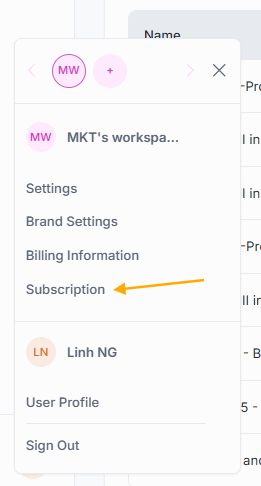
- Go to the user menu (avatar area, bottom-left of the sidebar)
- Click Subscription
- In the Add-Ons section, find Michi AI — labelled "Included 1 free operation for all plans. Try out now!"
- Toggle Michi AI on
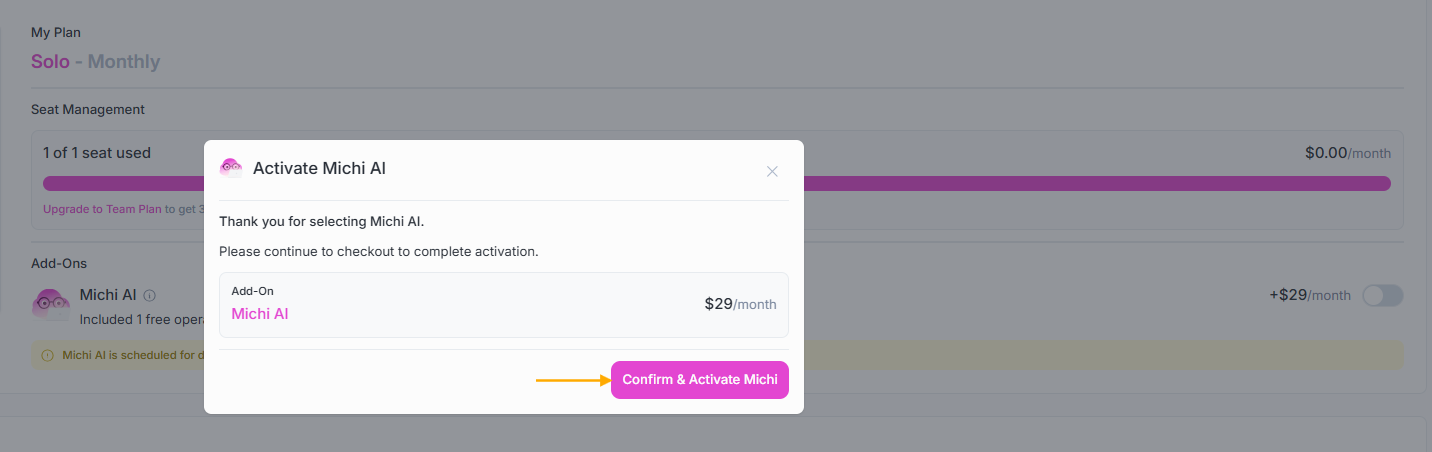
- Click Confirm & Activate Michi
- Michi AI is active immediately
What the Activation Modal Shows
The modal confirms your billing details before charging. What you see depends on where you are in your billing cycle.
Activating at the start of a billing period:
The full Add-on price applies from the next billing date. The modal shows your total cost after Add-on:
Solo plan: $150/year + AI Assistant: $290/year = Total: $440/year
Activating mid-billing period:
Magic Map calculates a pro-rata charge for the remaining days in your current period. The modal shows:
"Pay $X today, then $290/year at renewal."
For example, activating an annual Add-on six months into your billing year results in a charge of approximately $145 today, with the full $290 charged at your next renewal.
The charge is processed immediately when you confirm. If the payment is declined, the Add-on is not activated and your account remains unchanged.
Activating During a Trial
If your workspace is on a Solo or Team trial, activating the AI Add-on ends your trial immediately.
The modal warns you explicitly: "Activating Michi AI will end your trial period and promptly initiate your paid subscription."
If you confirm, your trial ends, your card is charged for both the plan and the AI Add-on, and Michi is activated immediately. If you click Continue Trial, your trial continues without the Add-on - your 1 free AI operation remains available during the trial.
After Activation
Once activated, the following are available instantly without refresh required:
Smart Import (learning materials)
The AI-powered import path is unlocked in Create New > Import map. When you select Import Unit Learning Materials, Michi reads your uploaded file and suggests how your content maps against TGA criteria.
- Available from Create New > Import map > Import Unit Learning Materials
- Also available from within any existing map via the Import button in the map toolbar
- Unlimited operations without counter shown in the modal
Note: Import Existing Mapping File (the non-AI path) was already available and continues working as before, nothing changes for that path.
Smart Grouping
The Smart Grouping button in the map editor toolbar is now fully active on Group mode maps (Solo and Team plan).
- Available from the map editor toolbar on any Group mode map
- Requires the map to have content rows already mapped
- Unlimited operations without counter shown in the modal
All workspace members benefit immediately (Team plan)
On a Team plan, the Michi AI add-on applies to the entire workspace. Every active Collaborator can use Smart Import (learning materials) and Smart Grouping with unlimited operations from the moment you activate, there is no per-user toggle and no per-user limit.
The AI Operations Counter After Activation
Once the Michi AI add-on is active, the AI operations counter is bypassed entirely. Magic Map checks whether the add-on is active before checking the counter, if active, the counter is not consulted and not decremented.
What this means in practice:
- Unlimited Smart Import (learning materials) runs without counter shown
- Unlimited Smart Grouping runs without counter shown
- Your free lifetime operations (however many remain) are held in reserve unchanged
Example: if you had 1 free operation remaining when you activated the add-on, that operation is still there. It is not consumed by add-on usage. If you later cancel the add-on, you still have that 1 free operation available.
Activation takes under a minute from the Subscription page — the main decision is whether to go monthly ($29/month) or annual ($290/year, saving $58). If you're mid-billing-period, the pro-rata charge means you only pay for the time remaining, so there's no penalty for activating now rather than waiting for renewal.
Related articles:
- Michi AI Add-On Overview
- AI Operations: Free Trials and the Add-On
- Smart Import: Step-by-Step
- Smart Grouping: Step-by-Step
- Managing Your AI Add-on